How To Make A Business Card In Photoshop : Business Card Template For Photoshop Creative Photoshop Templates Creative Market : Photoshop business card template for free download.
Dapatkan link
Facebook
X
Pinterest
Email
Aplikasi Lainnya
How To Make A Business Card In Photoshop : Business Card Template For Photoshop Creative Photoshop Templates Creative Market : Photoshop business card template for free download.. In this tutorial, i am gonna make a fantastic business card psd. How to create a professional business card in photoshop despite living in a digital world, a professional business card can be critical to the development of your business. Logaster will guide you through the entire process. It's got well organized layers and comes in the standard 3.5x2 inch size. #pixplay #qr #business #card #design #photoshop #tutorialbusiness card design with qr code in photoshoppixplay || imagination & creativityin this video, you.
When you need to make and print a set of business cards quickly, you can create it using popular software like adobe photoshop cc just un a few minutes. Hello everyone,in this photoshop tutorial. Make sure that you can find the layers panel when working in photoshop. In this groovy tutorial, we'll take a look at the basics for designing a business card in adobe's. Learn how to easily create business cards in photoshop.
Clean Business Card Design Bangla Tutorial How To Make A Business Card In Photoshop Maxpoint Hridoy Graphic Design Tutorial Learn More Earn More from 1.bp.blogspot.com Despite the seeming complexity, getting the hang of adobe photoshop won't take much time. Open photoshop and go to menu up top. Business cards are an effective way of getting your name out there and to connect with business prospects. Hello everyone,in this photoshop tutorial. Create business cards in photoshop. In this groovy tutorial, we'll take a look at the basics for designing a business card in adobe's. All your business card detail should be inside this area. If you want an easy way to add your profile photo, consider this free business card template for photoshop.
To duplicate them, so they are the same go over to the layer box, go down to the bottom where there are some icons, click the icon that looks like a piece of paper with its corner folded in.
This designer has completed over 1,500 jobs on envato studio, with a 100%. Launched in 2007, vandelay design is one of the leading web design blogs and has reached more than 50 million visitors. If you're intending to print a lot of cards, most likely you'll be printing them on an offset press. Again select the rectangle tool and draw a rectangle with fill 0%, stroke 1px and width 3.25 inch and height 2.25 inch and you will get the result like these. #pixplay #qr #business #card #design #photoshop #tutorialbusiness card design with qr code in photoshoppixplay || imagination & creativityin this video, you. Today i will make a beautiful business card psd in adobe photoshop. Learn how to apply effects and text, how to create masks, and how to resize images in photoshop. First, you will need to load adobe photoshop on your computer. Specify the size and resolution To craft a unique business card all by yourself, use adobe photoshop. Hello everyone,in this photoshop tutorial. If you want to design a vertical business card you would switch these, 3.75 for height and 2.25 for width. Professional business card design by brandbusters.
Place blank cards or any stationery element on a surface and take photos of them. This designer has completed over 1,500 jobs on envato studio, with a 100%. Create business cards in photoshop. Then let's start the tutorial without further ado. Get tips on how to save a business card as a signature in your email.
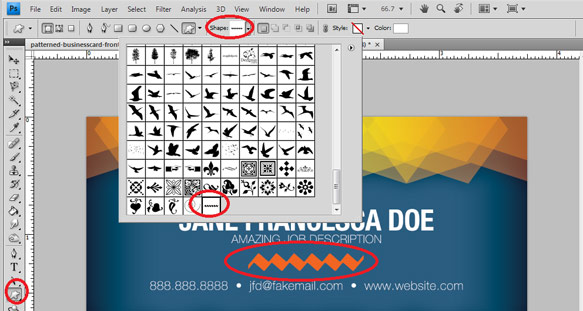
How To Make Business Card In Adobe Photoshop Cc 2018 Make Business Cards Make Business Business Cards from i.pinimg.com Choose a color from your color palette using the eyedropper tool (i). It's ready to print, with bleed marks, illustrator vector file or photoshop file and high resolution jpg. Launched in 2007, vandelay design is one of the leading web design blogs and has reached more than 50 million visitors. Standard dimensions for a business card are 3.75 inch by 2.25 inch. When you need to make and print a set of business cards quickly, you can create it using popular software like adobe photoshop cc just un a few minutes. The default settings will be fine. If that's the case, select cmyk color. How to install or load custom shapes for business card photoshop template step 1 go to edit > presets and select preset manager.
Logaster will guide you through the entire process.
Standard dimensions for a business card are 3.75 inch by 2.25 inch. How to create a professional business card in photoshop despite living in a digital world, a professional business card can be critical to the development of your business. In this tutorial, i am gonna make a fantastic business card psd. If that's the case, select cmyk color. For just $50, you get a modern, unique, simple and clean business card design in all different formats. Create a new file or artboard with a4 canvas. Photoshop is one of many tools that excel with making exactly that; Make sure that you can find the layers panel when working in photoshop. The only thing you'll want to pay attention to is the mode dropdown. How to choose and edit the photos in photoshop. If you want an easy way to add your profile photo, consider this free business card template for photoshop. How to install or load custom shapes for business card photoshop template step 1 go to edit > presets and select preset manager. If you want to design a vertical business card you would switch these, 3.75 for height and 2.25 for width.
How to create a professional business card in photoshop despite living in a digital world, a professional business card can be critical to the development of your business. If you want an easy way to add your profile photo, consider this free business card template for photoshop. Photoshop is one of many tools that excel with making exactly that; Here you'll find 25 different tutorials (for photoshop, illustration, and even indesign) that teach the essentials of business card design. How to choose and edit the photos in photoshop.
Create A Simple Patterned Business Card Template In Photoshop Design Panoply from dpanoply.s3.amazonaws.com Download unlimited photoshop business card templates with envato elements: Open photoshop and go to menu up top. Photoshop is one of many tools that excel with making exactly that; If you want to come with a border for pint safety issues, then you can use a white border and for that you have to add bleed. Choose custom as the document type and enter the width and height of your business card (make sure to change the drop down menus to inches). To duplicate them, so they are the same go over to the layer box, go down to the bottom where there are some icons, click the icon that looks like a piece of paper with its corner folded in. Photoshop business card template for free download. It's ready to print, with bleed marks, illustrator vector file or photoshop file and high resolution jpg.
To craft a unique business card all by yourself, use adobe photoshop.
It will duplicate it, so you can move it to check if they match up. First, you will need to load adobe photoshop on your computer. Get tips on how to save a business card as a signature in your email. Then, click ctrl+n to start a new file. Make sure that you can find the layers panel when working in photoshop. Learn how to easily create business cards in photoshop. Again select the rectangle tool and draw a rectangle with fill 0%, stroke 1px and width 3.25 inch and height 2.25 inch and you will get the result like these. So, to begin, open the pdf version of our business card template in photoshop. Use the color bucket or gradient tool to create a background color. If you want to come with a border for pint safety issues, then you can use a white border and for that you have to add bleed. Today i will make a beautiful business card psd in adobe photoshop. It's ready to print, with bleed marks, illustrator vector file or photoshop file and high resolution jpg. How to install or load custom shapes for business card photoshop template step 1 go to edit > presets and select preset manager.
What Are The Signs Of Abdominal Cancer / Gastric Cancer Practice Essentials Background Anatomy - Abdominal cancer refers to any particular cancer that may affect one or more organs within the abdominal region. . But here are 7 potential warning signs that warrant a trip to your doctor for further evaluation. Sometimes the first sign of colorectal cancer is a blood test showing a low red blood cell count. May be due to primary growth of a tumour or spread from another tumour (metastases, secondary tumour). Prognosis of abdominal cancer varies depending on the type of cancer and prognosis is also good if the cancer cells have not spread outside the polyp. Gastrointestinal symptoms that don't go away. That sometimes radiates into the back because the pancreas is in the back of the abdomen. pancreatitis, which is an inflammation of the pancreas, can be a sign of pancreatic cancer if the condition is chronic or when it appears for the first. Any lump, enlargement, har...
Making Christmas Cards With Babies / Meet The Cutest Christmas Babies Who Can be on Your ... / It's an easy religious christmas craft for kids of all ages. . Let baby play with something holiday related—like a shiny ornament or a santa hat—and. 25 diy christmas cards crafts for kids to make preschool & kindergarten diy christmas cards. Browse the cards in the section and select the one/s you like. 51 christmas diy card idea for kids cute christmas tree diy card here's a simple and cute christmas tree card. Make some simple, easy, and stunning paper poinsettia and magnolia cards for your friends this year. 51 christmas diy card idea for kids cute christmas tree diy card here's a simple and cute christmas tree card. Design your christmas cards from scratch. Browse the cards in the section and select the one/s you like. See more ideas about christmas cards, christmas cards to make, xmas cards. Create your very own design for more creative freedom! ...
Make Bootable Sd Card / Sd Cards And Writing Images Learn Sparkfun Com / Creating a bootable sd card requires an sd card reader operational under linux to format and access the linux partition of the card. . How to make bootable sd/sdhc cards for every operating system after the bootable sd card is created, check the following bios settings: Simply select the image file, choose the drive letter of your sd card and press the write button. Fortunately there are a few utilities around that can do all of this for us in a single operation. Android now boots from the microsd card. The default way of using a raspberry pi is to boot it using an sd card: Android now boots from the microsd card. The default way of using a raspberry pi is to boot it using an sd card: See the installation section of the documentation for more information on how to install a suitable operating system on an sd card. If the line is in the /dev/mmcblk0p1 format, then your drive address is: Ubuntu im...




Komentar
Posting Komentar